Upload Once.
Get a Publish-Ready Document.
ShabdSetu transforms your scanned Indian language documents and audio recordings into clean, translated, proofread Word files — ready for editing, publishing, or printing. Supports Hindi, Gujarati, Bengali, Tamil, Telugu, Kannada, Marathi, Punjabi & English. No retyping. No manual cleanup.
Start ProcessingMost OCR tools just extract messy text and leave you to fix it. Audio transcription tools give you raw, unedited dumps. ShabdSetu goes further — whether it's a scanned page or a recorded interview, we clean, translate, and proofread it, then deliver a formatted Word document you can actually use.
From Upload to Publish-Ready in One Step
Upload
Scanned PDF, DOCX, or audio file (MP3/WAV)
We Process
AI extracts, cleans, translates & proofreads your content
We Deliver
Clean, formatted Word document in your inbox
You Focus
On design, editing, and publishing. Not typing.
Built for People Who Work With Indian Language Documents
Publishers & Print Houses
Digitize Indian language books and manuscripts without retyping a single word
Journalists & Media
Turn recorded Indian language interviews into polished, print-ready articles
Legal & Government
Convert regional language case files and records into editable documents
Cultural & Religious Orgs
Preserve regional language scriptures and heritage texts digitally
Researchers & Academics
Extract and translate content from regional language archives
Podcasters & YouTubers
Transcribe Indian language audio recordings into formatted blogs, show notes, or subtitles
Not Just OCR. A Complete Document Pipeline.
| Feature | Others | ShabdSetu |
|---|---|---|
| Text Extraction | Extract raw text | Extract + clean + proofread |
| Error Handling | You fix errors manually | AI fixes errors automatically |
| Output Format | Plain text output | Formatted Word file (.docx) |
| Language Support | English only | 9 Indian languages supported |
| Audio Support | No audio support | Audio → polished document |
See the Difference
From a blurry scanned page to a clean, publish-ready document.
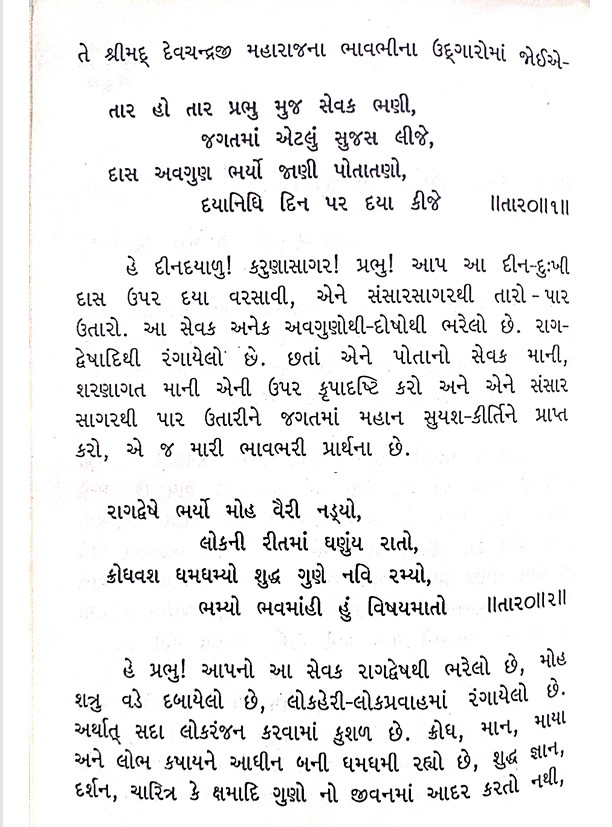
Scanned Gujarati PDF — unusable as-is
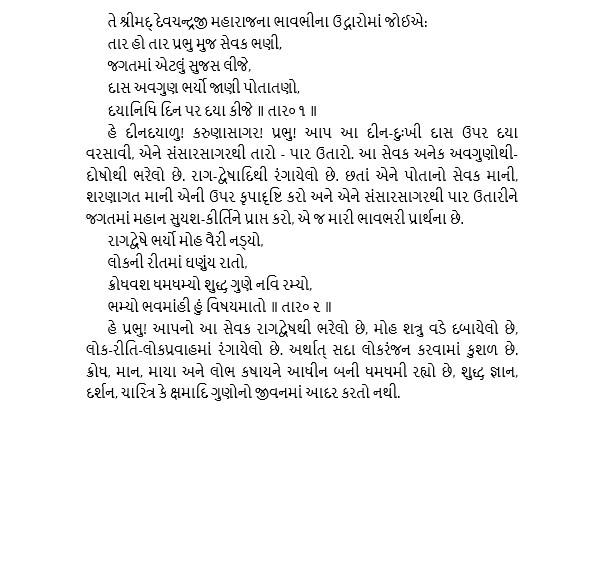
Clean, formatted, translated Word document — ready for publishing
Try Before You Pay
We offer a free trial with limited units so you can experience publish-ready output before committing. No software to install — just upload your file and see the magic.
Start Free Trial